Wednesday, May 2, 2012

How to get your resume "Silicon Valley Ready" - Part I

Per my last post, I've been given the opportunity to review a nice pile of resumes. As I am prone to, this got me to obsess a tad over how the resumes were put together and more importantly, what each told me.

What I perceived as issues are, in retrospect, my fault, not the resume owner's. That's because, per the entire point of my last post, the start-up environment is radically different than the corporate IT department. And the latter is where many of these resumes came from (which is exactly what I wanted and asked for).

In many cases, I received a resume from someone that included the regular set of data - experience, education, skills, etc. But the ones that got me excited were the ones where the person included in the email links to the websites or mobile-apps they had built. As I've said - the number one selling point for you as an engineer to get a job in Silicon Valley is that you love this stuff. There's an age-old conundrum of new grads who say "Employers want me to have experience before they'll hire me - but how do I get experience if I can't get a job?"

In our business I'm happy to say - that problem does not exist. Simply because you don't need anyone to give you a job to build something. A website. A mobile app. Heck, a program that finds smaller sets of strings in larger ones.

I realized that's probably the number one thing I'm looking for. You can show me, with no doubts, that as a software engineer - you can build something. Start to finish.

Interestingly, I like to think that I also don't put that much weight into whether a project was a commercial success. If it was, that's nice but and maybe it's because you are not only a great engineer but you have an awesome product sense - who knows (it just might mean you were lucky too). And unless it wasn't a commercial success because it was poorly engineered, that's not really the point. The point is that you built it. Or at least some non-trivial part of it.

With that in mind - this article sprang forth on what I like to see in resumes. I'll point out that this isn't very different from what I looked for when I was on a hiring committee at Google (so there are at least some current Google engineers that are partially there because of these thoughts).

First - I propose a new section to resumes - at least for software engineers. In addition to Experience, Education, Skills, Interest, and References (not suggesting we remove any of those) - I propose we add Cool Stuff I Have Built.

If your resume is going to go over one page (which, personally, I don't mind) - I'm hoping it's because of this section.

Any project you did solo or had a major hand in - whether paid or not paid, million users or just your mom, I'd love to know about. Websites, iphone apps, android apps, desktop apps, open-source projects, github accounts - you name it. Solo or as part of a team (indicate that). But it has to be, in one way or another "finished". Even if your iphone app was rejected by the app store - you can point me to a link to see it. It doesn't have to be a product either - maybe its an open-source project. The bottom line is it is something that you "finished". You executed. Your idea became a living breathing application or piece of code that in some way some how you could show to people.

The section might be broken up into individual projects with bullet points about each. For example:

Project Name: Mailinator
Technologies used: Java, tomcat, (no database)
Team Size:5'11", 175lbs (haha)
Implementation details/challenges:Custom server architecture built as an experimental test-bed for highly-multithreaded server design. Custom SMTP server. No database as emails are stored in RAM with a custom compression scheme.
Notable Metrics: up to 25MM emails per day, ~20k users per day, runs on a single server (on purpose as part of a personal experiment to optimize the system).
relevant links: www.mailinator.com, http://mailinator.blogspot.com/2012/02/how-mailinator-compresses-email-by-90.html


Surely you could add other bullet points too (and suggestions welcome, leave a comment to this post). But you get the idea.

My previous post resonated strongly with some people - that is, they were in "IT departments" feeling like they weren't growing technically. And as you can imagine, a resume telling me you did a payroll system is great - but it's not what (most) start-ups are building. But what if you haven't built anything? And your "Cool Stuff I've Built" section is empty?

Well .. fix that.

No one is stopping you from building something. No one said you're ready for a transition out of your current job today and as with much of life it's up to you to take yourself to the next level. But nearly any person that already writes software with a penchant for learning and some ambition can spend the next few months of nights and weekends learning and building. (And it's absolutely possible that your day job accomplishments belong in that cool stuff section too).

So if by day you're a payroll guy, but by night you're in iphone ninja - you've got my attention. Not only because you have the skills that I'm looking for - but that in your spare time, you're out doing great things. And instead of going out every night drinking with your friends - at least some of those nights, you chose to stay home and learn and build cool stuff. And why would you do something like that? Simple - you love this stuff.

(My start-up is located in Palo Alto and I am right now interviewing for the initial engineering team. We're well-funded, building cool stuff, and plan to change, ya know, the world. No matter where you are - if you're a software engineer, willing to relocate to San Francisco/Silicon Valley (and of course, love to build great things) send me your resume. paul@refresh.io or check out www.refresh.io/jobs)

Tuesday, February 21, 2012

How Mailinator compresses email by 90%

Given the title of this article, the first thing that should pop into your mind is probably - "well, use a compression algorithm - right?".

Right! Well, yes, well, not exactly. Read on.

Your second thought might also have been - "Why bother? Just buy more disks."  Which in the big picture is also not a bad answer. But for Mailinator that doesn't work - if you have read previous Mailinator tech articles you might know that Mailinator stores all it's email in RAM.

There were good reasons for that when Mailinator started. One was the use case - which was always disposable email that lasts a few hours (rather longer nowadays). Secondly, when Mailinator started, disks and datastores weren't as sophisticated/fast as they are now.

Also, Mailinator is/was always a free service so keeping costs down was always important. To this day, Mailinator runs on a single server. It averages about 4-5Terabytes of bandwidth a month and the peak incoming email rate I've seen is about 3500 emails/sec (this is just a production observation, server limit is bandwidth, not CPU).

And finally - last but not least - to me, much of web and application development today is utterly devoid of any fun algorithms. I spend a non-trivial amount of time in interpreted/dynamic scripting languages that do a fantastic job of hiding (or at least lure me away from thinking about) algorithmic complexity. I've probably inadvertently written more n^3 algorithms than, um, (n^3)-for-some-large-value-of-n.

Mailinator has always been my test bed for trying fun ideas, algorithms, and datastructures. In other words - I probably didn't need to do all the work I'm writing about here - but I definitely did have fun doing it (probably should have been out talking to girls, but alas).

Compression

Ok - so back to 90% compression.

So to start testing, I grabbed a few hundred megs of the Mailinator stream and ran it through several compressors. Mostly just stuff I had on hand 7z, bzip, gzip, etc. Venerable zip reduced the file by 63%. Not bad. Then I tried the LZMA/2 algorithm (7z) which got it down by 85% !

Well. OK! Article is over! Everyone out! 85% is good enough.

Actually - there were two problems with that result. One was that, LZMA, like many compression algorithms build their dictionary based on a fixed dataset. As it compresses it builds a dictionary of common sequences and improves and uses that dictionary to compress everything thereafter.

That works great on static files - but Mailinator is not a static file. Its a big, honking, several gigabyte cache of ever changing email.  If I compressed a million emails, and then some user wanted to read email #502,922 - I'd have to "seek" through the preceding half-million or so to build the dictionary in order to decompress it. That's probably not feasible. And, as I said, the Mailinator cache is constantly throwing out old emails and putting in new ones.

In other words, an algorithm that relies on previous entries to build a dictionary can't work given that we keep purging the front of the stream never to be seen again.

Hence, we cannot compress emails "together". But we can compress them individually. Sadly, this hurts our compression ratio - and by a lot. The algorithm now must start building a new dictionary with each email. And emails are small so the dictionary isn't very mature by the time we're done compressing in many cases.

We can help this situation by giving the compression algorithm a pre-built dictionary. That is, scan a typical piece of data to be compressed, find common sequences and create a list of them. Then we give that dictionary to the compressor/decompressor as it takes off.

Woopsie. Again, the Mailinator stream is a living and breathing entity that's always changing. One minute might be a few million viagra spams, the next minute might be all about fake rolex watches. In other words, there is no "typical piece of data" -  a static dictionary built off a sample of emails will be obsolete in relatively short order.

So, the first idea was to build a sliding dictionary builder. Each email is scanned for string occurrences and we keep a count of them. Then every so often (minutes or hours), the compressor switches to using the most recently constructed dictionary. Every compressed email is given a reference to its dictionary so when/if it needs to be decompressed, it knows what dictionary to give the decompressor. Many thousands of emails share the same dictionary so RAM to store dictionaries isn't particularly significant.

Well, that's great and does restore LZMA back to about 60-70% but remember I mentioned I had  another problem with LZMA? Speed.

The C++ version of LZMA by Igor Pavlov compresses at about 1.7MB/s per CPU core  on my test machine. Um. no. Firstly, Mailinator can pull down tens of MB per sec at times. Secondly, no component of our processing pipeline can be allowed to take up this much CPU (my rule, not yours). We need our CPU for other things when large volumes of mail arrive. (The java version by the way was about the same speed).

Simply - LZMA is pretty awesome - but it's too slow for this purpose.

So the for the moment, I fell back to using a fast but simpler compression (zlib/LZW) on individual emails - and we sink down to about 40-50% savings from compression.

A Bigger Idea of a "Dictionary"

The next step for me was to think about email composition. We get lots of different types of email - but we get lots of the same types too. For example, we get lots of newsletters (people send them to Mailinator then read them via POP or RSS).

The nice thing for us is that a newsletter email blast could be 10,000 emails that are, all the same. Well, ok, not exactly - no two emails are ever the "same" because headers have times, dates, message-id's, etc. within them. But if we remove the headers, you can get 10,000 emails going into 10,000 different inboxes that all have the same message "body". Are you thinking what I'm thinking?

Right - store each email with it's own headers plus a pointer to ONE system-wide byte-array containing the newsletter body. What's the "compression" ratio of that? Well over 90%. And just to be a snot we can then apply compression to that byte array to eek out another few percent. We're reusing memory here so it's not exactly "compression" but we are reducing the size of the data sent to by some fantastic amount for this happy use case.

This isn't a revolutionary idea (online music libraries do the same thing) but it does fit pretty nicely in the Mailinator paradigm. Sadly apart from newsletters, not many other email sets, spam or otherwise have email bodies that are identical. In fact, spammers specifically change the subject line and destination url of every email they send for tracking and spam-detection-thwarting purposes. So what you get is something like this (headers omitted):

Email 1:
Buy vi4gra now!
http://rrr4.somerandomthing.com/?3jwow33oo
Happy man are you will be!

Email 2:
Buy vi4gra now!
http://1rr220.somerandomthing.com/?ajo200kko
Happy man are you will be!

So much for simply detecting identical email bodies. And this goes for less nefarious things too. Sign-up emails from websites will contain the same surrounding text with different names and validation urls inside.

What we could use here is a Longest Common Substring (LCS) algorithm. Basically, it would compare the two email bodies and be able to break them up as:

Common string 1:
Buy vi4gra now!\r\nhttp://

Disparate strings:
rrr4.somerandomthing.com/?3jwow33oo
1rr220.somerandomthing.com/?ajo200kko

Common string 2:
\r\nHappy man are you will be!

Nice .. each email is stored as 3 (compressed) byte arrays where 2 of those can be shared.

Unfortunately, classic LCS algorithms are expensive. Comparing two sequences is an O(nm) algorithm. And we're not interested in comparing two sequences, we're interested in comparing each new sequence (er.. each new email) with the few million that preceded it. Also, the LCS algorithm is also very memory expensive in the creation of trie datastructures - again, scaling to millions of emails just doesn't fit in our parameters.

Generally speaking, there are a lot of tricks I've noticed in analyzing algorithms. A few off the top of my head are: if you see an easy O(n^2) algorithm, it's rather likely there's an O(nlogn) one hiding in there somewhere. In contrast, if your dataset is small, you might be better off sticking to algorithms that make your CPU's cache and instruction pipeline happy instead of worrying about algorithmic running time (i.e. bubblesort > quicksort for small data). Lastly - if you can make assumptions about your data, you can often short-cut the classic algorithm with an good approximation.

Caching Lines

Cool, so let's assume something about the data. For emails, as it turns out, disparate parts of emails often occur on line boundaries (as you see in lines 1 & 3 above). A few same lines, a different one, a few more same. Instead of looking for common sequences based on individual characters, we can treat individual lines as units. Then we can attempt to find multiple occurrences of those lines. It cannot be as precise as LCS proper as in our above example (we would not find the identical portion "http://" in line 2) but we're basically settling for a greedy approximation, and one that works pretty well.

How do we store it though? LCS's tries would kill us. I know - let's use an LRU cache. Those darn things work for everything!  We can use an LRU cache that caches full email-lines. It will inherently flush out old email lines as the spam stream evolves (nice!) and will provide quick look- ups to compares thousands of lines at once (happy!). Specifically in Java, an LRU-cache is a synchronized LinkedHashMap with true as the last constructor parameter and an overridden removeEldestEntry.

So we store a few 10's of thousands of email lines in an LRU cache and then as each new email comes in, we check to see if that line is in the cache. If it is, we reuse the one in the cache instead of creating new storage for this email. By assuming all common sequences are bounded at newlines, we remove the boundary-discovery work LCS must do. Strictly speaking, we're cheating and losing some opportunity, but it's a good enough guess for this type of data.

This had a dramatic effect on our "compression" (again, it's slighty dubious to call it compression but, as you consider the big picture, our entire machinery of the LRU cache and bastardized LCS-in-spirit algorithm is creating a reuse-dictionary, it might not actually be compression - but it goes through several of the motions).

Caching Multi-lines

Caching lines is great - but what about caching multi-lines? Say we have a few emails - for brevity, assume each character in the following examples are email "lines":

Email 1:
ABC1

Email 2:
ABC2

Email 3:
ABC3

Email 4:
ABC4

So the first 3 lines are all the same in each email (ABC), the 4th lines are numbers which are not the same. Our algorithm:

1) Load a LINE and see if it's in the cache (if no more lines, quit)
2) .. if it's not there, put LINE in the cache, and store LINE in the email - GOTO 1
3) .. If it IS there:
4) .... see if LINE + NEXT_LINE is in the cache
5) .... if its not there, put LINE + NEXT_LINE into the cache and store LINE (which is a cache hit) in our email - GOTO 1
6) .... if it IS there, LINE = LINE + NEXT_LINE, - GOTO 4;

So if we run our 4 emails above through this algorithm. We get the following:

Running through all of email 1 - we get:
- Cache HITS stored in email: none
- Cache MISSES stored in email: A,B,C,1
- Cache contents afterwards (lru order): 1,C,B,A

Running through all of email 2 - we get:
- Cache HITS stored in email: A,B,C
- Cache MISSES stored in email: 2
- Cache contents afterwards (lru order): 2,C2,C,BC,B,AB,A,1

(notice how '1' (which didn't cache hit) has worked itself to the end)

Running through all of email 3 - we get:
- Cache HITS stored in email: AB,C
- Cache MISSES stored in email: 3
- Cache contents afterwards (lru order): 3,C3,ABC,AB,A,2,C2,BC,B,1

Running through all of email 4 - we get:
- Cache HITS stored in email: ABC   <-- very cool result, note coolness
- Cache MISSES stored in email: 4
- Cache contents afterwards (lru order): 4,ABC,AB,A,3,C3,C,2,C2,BC,B,1

So what happened? The system has realized that ABC is cacheable and is now pointing to that. All subsequent emails with the set-of-lines ABC will reuse the same memory. Note that the disparate lines 1,2,3, and 4 will always be stored separately, but the algorithm will then pick-up any common line-sets later in the email too (if there were any).

This elaborate system to find equal email lines and reuse them drags out compression of the entire flowing email stream down to about 80%. What about 90%?  Well.. one more trick.

Back to LZMA

Remember LZMA from above that we abandoned because it was too slow to happen inline? As you'd guess, the biggest impact it had was on bigger emails. And although it's a CPU hog, we do actually have a few cores laying around. So let's give it one (but seriously, just one).

We setup one core (i.e. thread) to trail behind and scan incoming email for ones that are over some size (say 20k) and re-compress those using the sliding dictionary LZMA we mentioned earlier. While 3 of our cores average 5-10% utilization by receiving, analyzing, and storing incoming email - the 4th core sits at 100% re-compressing emails where it will find benefit. If it gets too far behind, it simply leaps ahead and leaves some compression on the table.

(Note that empirically, LZMA is an order of magnitude faster decompressing than compressing, otherwise that would have been a new problem as it could take too long when someone wanted to read an email)

Voila. 90%. (Two notes: 1: that's a reasonable average at least... sometimes better, sometimes worse and 2: I realize I'm not exactly sure what "Voila" means, looking that up now).

There are also some other important notes. Storing a byte array in Java costs something. The pointer alone (64bit) is 8bytes. Then there is the byte length field, padding, etc. In other words, I limited the system to never store email lines under 64 bytes. Small lines get concatenated together straight away.

Second, there are more email-idiomatic tweaks we can do to improve the situation. Base64-encoded attachments are effectively un-cacheable, so we pass over those.

Third, although from our cheeky example it may seem like we're finding optimal line sets (i.e. ABC). We're not. We could end up caching ABC and destroying an opportunity for a more optimal BCDXYZ or something. I'm guessing this doesn't happen often but would be an interesting future consideration.

Edit: Wow, sincere thanks to an Anonymous commenter for making me reconsider the above algorithm. I had originally stated it was O(n^2). My first version was indeed O(n^2) (which wasn't written about) and after a few changes it became O(n) and I failed to see that. I find its very easy to find tech reviewers once an article hits Hackers News, before then though - not so much. :)   My apologies for the error.

So for the end-user, this whole diatribe simply means little except their emails are sticking around longer. They have no idea that when they click to read an email we may be LZW or LZMA decompressing tens of byte arrays shared by thousands of emails with a custom-sliding dictionary built by scanning emails that arrived hours ago and then catenating them together so they can be shown on their webpage all in a few milliseconds. And they likely don't care, they're probably too busy signing up for Minecraft or something.

But that's ok. I know.

And if you got this far, you know too.

Ok.. now back to real work. What was I doing again? Oh yeah, writing some slick one-liners in Ruby. No clue on the running times - probably like O(n^4) or something, but if I fiddle with it a bit more - I bet I can cut the character count of the code by half!

Tuesday, June 9, 2009

A Beautiful Race Condition

I recently gave a keynote at the ICIS 2009 conference in Shanghai. The topic was why multithreaded programming seemed so easy, yet turned out to be so hard. The fun part was I investigated (per my last post and this one) several old, personal concurrency demons I knew existed but wanted to know more about.

One of those was, indeed, my favorite race condition. It doesn't escape me that its probably wholly unhealthy to even *have* a favorite race condition (akin to having a favorite pimple or something) - but nonetheless, the elegance of this one still makes my heart aflutter.

The scenario of this race is that we assume, not terribly inaccurately, that race conditions at times, can cause corrupted data. However, what if we have a situation where we sort of don't mind some corrupted data? A "good enough" application as it were.

The dangerous part of all this is if we assume (without digging in) what kind of data corruption can happen. As you'll see, you might just not get the type of data corruption you were hoping for (which is one of the sillier sentences I've ever written).

The particular instance of this kind of happy racing I've encountered is where someone uses a java.util.HashMap as a cache. I've never done such a thing myself, but I heard about this race and thus this analysis. They may use it with a linked-list or maybe just raw, but the baseline is that they figure a synchronized HashMap will be expensive - and in their case, a race condition inside the HashMap will just lose (or double up on) an entry now and then.

That is - a race condition between two (or more) threads might accidentally drop an entry causing an extra cache miss - no biggie. Or, it may cause one thread to re-cache an entry that didn't need it. Also no biggie. In other words, a slightly imprecise, yet very fast cache is ok by them. (of course, this assumption is dead wrong - don't do that - read on for why!)

So they setup a HashMap in some global manner, and allow any number of nefarious threads bang away on it. Let them put and get to their hearts content.

Now if you happen to know how HashMap works, if the size of the map exceeds a given threshold, it will act to resize the map. It does that by creating a new bucket array of twice the previous size, and then putting every old element into that new bucket array.

Here's the core of the loop that does that resize:


1:  // Transfer method in java.util.HashMap -
2:  // called to resize the hashmap
3:  
4:  for (int j = 0; j < src.length; j++) {
5:    Entry e = src[j];
6:    if (e != null) {
7:      src[j] = null;
8:      do {
9:      Entry next = e.next;
10:     int i = indexFor(e.hash, newCapacity);
11:     e.next = newTable[i];
12:     newTable[i] = e;
13:     e = next;
14:   } while (e != null);
15:   }
16: }


Simply, after line 9, variable e points to a node that is about to be put into the new (double-wide) bucket array. Variable
next
holds a reference to the next node in the existing table (because in line 11, we'll destroy that relation).

The goal is that nodes in the new table get scattered around a bit. There's no care to keep any ordering within a bucket (nor should there be). HashMap's don't care about ordering, they care about constant time access.

Graphically, let's say we start with the HashMap below. This one only has 2 buckets (the default of java.util.HashMap is 16) which will suffice for explanatory purposes (and save room).

As our loop starts, we assign e and next to A and B, respectively. The A node is about to be moved, the B node is next.


We have created a double-sized bucket array (in this case size=4) and migrate node A in iteration 1.


Iteration 2 moves node B and Iteration 3 moves node C. Note that next=null is the ending condition of our while loop for migrating any given bucket (read that again, its important to the end of the story).


Also important to the story, note that the migration inverted the order of Node's A and B. This was incidental to the smart idea of inserting new nodes at the top of the list instead of traversing to find the end each time and plunking them there. A normal put operation would still have to check that its inserting (and not replacing) but given a resize can't replace, this saves us a lot of "find the end" traversals.

Finally, after iteration 3, our new HashMap looks like this:


Our resize accomplished precisely the mission it set out to. It took our 3-deep bucket and morphed it into a 2-deep and 1-deep one.

Now, that's all well and good, but this article isn't about HashMap resizing (exactly), its about a race condition.

So, let's assume that in our original happy HashMap (the one above with just 2 buckets) we have two threads. And both of those threads enter the map for some operation. And both of those threads simultaneously realize the map needs a resize. So, simultaneously they both go try to do that.

As an aside, the fact that this HashMap is unsynchronized opens it up to a scary array of unimaginable visibility issues but that's another story. I'm sure that using an unsynchronized HashMap in this fashion can wrack evil in ways unlike man has ever seen, I'm just addressing one possible race in one possible scenario.

Ok.. back to the story.

So two threads, which we'll cleverly name Thread1 and Thread2 are off to do a resize. Let's say Thread1 beats Thread2 by a moment. And let's say Thread1 (by the way, the fun part about analyzing race conditions is that nearly anything can happen - so you can say "Let's say" all darn day long and you'll probably be right!) gets to line 10 and stops. Thats right, after executing line 9, Thread1 gets kicked out of the (proverbial) CPU.


1:  // Transfer method in java.util.HashMap -
2:  // called to resize the hashmap
3:  
4:  for (int j = 0; j < src.length; j++) {
5:    Entry e = src[j];
6:    if (e != null) {
7:      src[j] = null;
8:      do {
9:      Entry next = e.next;
     // Thread1 STOPS RIGHT HERE
10:     int i = indexFor(e.hash, newCapacity);
11:     e.next = newTable[i];
12:     newTable[i] = e;
13:     e = next;
14:   } while (e != null);
15:   }
16: }


Since it passed line 9, Thread1 did get to set its e and next variables. The situation looks like this (I've renamed e and next to e1 and next1 to keep them straight between the two threads as both threads have their own e and next).


Again, Thread1 didn't actually get to move any nodes (by this time in the code, it did allocate a new bucket array).

What happens next? Thread2, that's what. Luckily, what Thread2 does is simple - let's say it runs through the full resize. All the way. It completes.

We get this:


Note that e1 and next1 still point to the same nodes. But those nodes got shuffled around. And most importantly the next relation got reversed.

That is, when Thread1 started, it had node A with its next as node B. Now, its the opposite, node B has its next as node A.

Sadly (and paramount to the plot of this story) is that Thread1 doesn't know that. If you're thinking that the invertedness of Thread1's e1 and next1 are important, you're right.

Here's Thread1's next few iterations. We start with Thread2's bucket picture because thats really the correct "next" relations for our nodes now.


Everything sort of looking ok.. except for our e and next at this point. The next iteration will plunk A into the front of the bucket 3 list (it is after all, next). And will assign its next to whatever happens to already be there - that is, node B.


Woah. Thar she blows.

So right about now Thread1 goes into, what we like to call in the biz, an "infinite loop". Any subsequent get operations that hit this bucket start searching down the list and, go into, yep - an infinite loop. Any put operation that first needs to scan the nodes to see if its going to do a replace, will, you guessed it, go into an infinite loop. Basically, this map is a pit of infinite loopeness.

If you remember we noted that race conditions cause data corruption. Well, yeah, thats what we have here - just very unlucky data corruption on pointer structures. I'm the first to admit this stuff is tricky - if you found errors in my analysis I'll happily fix this post.

Now I had the happy fortune for a time of sharing an office with Josh Bloch who wrote java.util.HashMap. When I innocently mentioned he had a bug in his code given this behavior, he did indeed (to use Josh's word's) go non-linear on me.

And he was right. This is not a bug. HashMap is built specifically for its purpose and this implementation is not intended as threadsafe. There's a gaggle of ways to make it threadsafe, but in plain, vanilla, (and very fast) form - its not. And needless to say, you shouldn't be using it that way.

Race conditions are nothing to mess with and the worst ones are the ones that don't crash your program but let it wander down some unintended path. Synchronization isn't just for fun you know.

And nefarious uses of HashMap aside, I still attest - this is, indeed, a beautiful race.

Addendum: I've been yelled at a few times for calling any race condition "beautiful". I'll defend myself by our apparently human nature to generally call intricate complexity beautiful (i.e. waves crashing on a shore, nature in general).

Most races end up being about data-corruption. This one is data-corruption that manifests as control-flow-corruption. And it does so fantastically without an error (infinite loops notwithstanding).

As the evolution analogy goes, if you drive a needle into a pocket watch - chances are you'll simply destroy it. But there's a tiny chance you'll actually make it a better watch (clearly, not the case here). And another tiny chance you'll simply make it something "different" - but still, per se, functioning.

Again, my use of "beautiful" might be more appropriate as "a complex mutation with surprising non-destruction" :)

Monday, June 8, 2009

On Java Visibility

A semi-famous example of broken Java synchronization is this:

class SomeClass {

  private boolean keepGoing = true;

    public boolean get() {
      return keepGoing;
    }

    public synchronized boolean set(boolean x) {
      keepGoing = x;
    }
}

I believe this example is in Josh Bloch's book "Effective Java" (which I now notice I somehow lost my copy in my most recent move - don't tell Josh).

The idea is here that someone (ostensibly) thought that they'd save some performance by not synchronizing a getter and just synchronizing the setter. There definitely is a cost to synchronization and needless to say, getting doesn't change anything - so why bother paying that cost for gets?

As has been pointed out long before this post, without a synchronize on a getter, there is no guarantee of visibility when doing the get. That is, if one thread calls set(false), there's no guarantee that any other thread will know it happened.

Consider code that might use the code above:


class SomeOtherClass {

  SomeClass keepGoing = new SomeClass();

  class Thread1 implements Runnable {
    public void run() {
      while (keepGoing.get()) x++;
      System.out.println("done1");
    }
  }

class Thread2 implements Runnable {
    public void run() {
    keepGoing.set(false);
  }
  }
}


Let's say you start a Thread1 running. And of course, keepGoing.get() is true, so it just keeps looping along. Then lets say an eternity (or maybe 2 seconds) later you start Thread2.

If we had reliable visibility, Thread1 would end the moment after Thread2 sets keepGoing to false.

If you've read Josh's book, its no surprise that it doesn't. Specifically, Thread1 doesn't end. It keeps going. Thread2 ends happily and Thread1 never ends.

The only interesting part to me was that this always worked. Always. Adding to the complexity of visibility concerns is that memory is "leaky". That is, even without guaranteed visibility you often get unreliable visiblity.

So, I dug a little deeper. If you're adventurous enough to grab a debug-version of the JDK and run it with the -XX:+PrintOptoAssembly option. You get to see the optimizations the JIT are making. That is, you see the assembly code version of your Java code - post-optimization. Check out Koshuke Kawaguchi's Blog for some instructions.

So here's Thread1's loop code after JIT optimization at runtime:

02c movq R10, precise klass manybrain/test/Main: 0x0000000040a50968:Constant:exact * # ptr
036 movsbl R8, [R10 + #596 (32-bit)] # byte ! Field manybrain/test/Main.keepGoing
03e testl R8, R8
041 je,s B4 P=0.000000 C=147944.000000
041
043 B2: # B3 <- B1 Freq: 1
043 movl R8, [R10 + #592 (32-bit)] # int ! Field manybrain/test/Main.x
043
04a B3: # B3 <- B2 B3 top-of-loop Freq: 1e-35
04a incl R8 # int
04d movl [R10 + #592 (32-bit)], R8 # int ! Field manybrain/test/Main.x
054 testl rax, [rip + #offset_to_poll_page] # Safepoint: poll for GC # manybrain.test.Main$Thread1::run @ bci:14 L[0]=_
# OopMap{r10=Oop off=84}
05a jmp,s B3
05a
05c B4: # N53 <- B1 Freq: 4.76837e-07
05c movl RSI, #27 # int
061 nop # 2 bytes pad for loops and calls


If you're old school, welcome home.

If you're not, then this might look like a lot of goop. So let's parse out just the interesting parts.

Line 41 is an conditional jump. Basically, if keepGoing (per the comment in line 36) is false, we jump to line 5C (label B4) and end the code segment. You and I know that keepGoing started true, so basically that jump isn't followed.

Lines 43-5a are the loop that does x++.

And checkout line 5a. That is an unconditional jump back to the top of the loop. So what does all this mean? That the JIT did some very aggressive optimization. In fact, remember our original loop from Thread1?


while (keepGoing.get()) x++


The JIT has optimized this to:

if (keepGoing.get()) {
  while (true) x++;
}


No wonder the loop never ends. You've got bigger problems now than a little leaky visibility issue. I'm positive I'm oversimplifying, but effectively the JIT saw your get method wasn't synchronized and made the assumption that it could optimize as such. If you didn't guarantee visibility, it didn't need to either. Obviously, add the synchronization modifier to the get method and all this badness won't happen.

Moral of the story is much like the inevitable topics discussed at a lunch with Jeremy Manson - you can't optimize away correct synchronization; as all you'll probably do is optimize the "correctness" part away.

Monday, February 18, 2008

Kill the myth please. NIO is *not* faster than IO

I'm giving 3 talks at the Software Developer's Conference West in Santa Clara, CA on March 3-7.

One of them is a tutorial on how to interview in Silicon Valley (fun stuff).

Another is how to write high-performance servers in Java. Specifically, why NIO is really not the best way anymore (post linux 2.6 kernel and NPTL) and multithreaded I/O is the new old-way of doing things. Its a fun talk and largely discusses the internals of Mailinator and how it runs a few thousand simultaneous threads without breaking a sweat.

On top of that, as it turns out, in pure throughput, IO smokes NIO in all tests I tried. And I'm not alone - Rahul Bhargava of Rascal Systems did a very nice analysis of this and posted it, sadly, in some forums at theserverside.com.

The post is solid gold and I'm posting it below just for posterity as I'd hate to see those forums come down some day and I lose access to that post. Incidentally, I disagree with Rahul that "fewer threads are easier to debug". It only takes 2 to make a deadlock or race condition.

The original URL for this post is:
http://www.theserverside.com/discussions/thread.tss?thread_id=26700

And like I said, it was written by Rahul Bhargava of Rascal Systems. Here it is:

-------------------------------------------------

I have been benchmarking Java NIO with various JDKs on Linux. Server is
running on a 2 CPU 1.7 GHz, 1GB RAM, Ultra160 SCSI 36GB disk

With Linux kernel 2.6.5 (Gentoo) I had NPTL turned on and support for
epoll compiled in. The server application was designed to support
multiple disptach models :

1. Reactor with Iterative Disptach with multiple selector threads. Essentially
the accepted connections were load-balanced between varying number of
selector threads. The benchmark then applied a step function to experimentally
determine the optimal # of threads and connection per selector ratio.

2. Also a simple concurrent blocking disptach model was supported. This is
essentially a reader thread per connection model.

Client application opens concurrent persistent connections to the server
and starts blasting messages. Server just reads the messages and does
basic un-marshalling to ensure message is ok.

Results were interesting:

1. With NPTL on, Sun and Blackwidow JVM 1.4.2 scaled easily to 5000+ threads. Blocking
model was consistently 25-35% faster than using NIO selectors. Lot of techniques suggested
by EmberIO folks were employed - using multiple selectors, doing multiple (2) reads if the first
read returned EAGAIN equivalent in Java. Yet we couldn't beat the plain thread per connection model
with Linux NPTL.

2. To work around not so performant/scalable poll() implementation on Linux's we tried using
epoll with Blackwidow JVM on a 2.6.5 kernel. While epoll improved the over scalability, the
performance still remained 25% below the vanilla thread per connection model. With epoll
we needed lot fewer threads to get to the best performance mark that we could get out of NIO.

Here are some numbers:

(cc = Concurrent Persistent Connections, bs = Is blocking server mode on Flag,
st = Number of server threads, ct = Connections handled per thread,
thruput = thruput of the server )

cc, bs,st,ct, thruput
1700,N,2,850,1379
1700,N,4,425,1214
1700,N,8,212,1240
1700,N,16,106,1140
1700,N,32,53,1260
1700,N,64,26,1115
1700,N,128,13,886
1700,N,256,6,618
1700,N,512,3,184
1700,Y,1700,1,1737

As you can see the last line indicates vanilla blocking server (thread per connection)
produced the best thruput even with 1700 threads active in the JVM.

With epoll, the best run was with 2 threads each handling around 850 connections in
their selector set. But the thruput is below the blocking server thruput by 25%!

Results shows that the cost of NIO selectors coupled with OS polling mechanism (in
this case efficient epoll VS selector/poll) has a significant overhead compared to
the cost of context switching 1700 threads on an NPTL Linux kernel.

Without NPTL of course it's a different story. The blocking server just melts at 400 concurrent
connections! We have run the test upto 10K connections and the blocking server outperformed
NIO driven selector based server by same margin. Moral of the story - NIO arrives at the scene
a little too late - with adequate RAM and better threading models (NPTL), performance gains
of NIO don't show up.

Sun's JVM doesn't support epoll() so we couldn't use epoll with it. Normal poll() based
selector from Sun didn't perform as well. We needed to reduce the number of connections
per thread to a small number (~ 6-10) to get comprabale numbers to epoll based selector.
That meant running lot more selector threads kind of defeats the purpose of multiplexed IO.
The benchmarks also dispell the myth created by Matt Welsh et al (SEDA) that a single
threaded reactor can keep up with the network. On a 100Mbps ethernet that was true: network
got saturated prior to server CPUs but with > 1Gbps network, we needed multiple selectors
to saturate the network. One single selector's performance was abysmal (5-6x slower than
concurrent connections)

For application that want to have fewer number of threads for debuggability etc, NIO may be
the way to go. The 25-35% performance hit may be acceptable to many apps. Fewer threads
also means easier debugging, it's a pain to attach a profiler or a debugger to a server hosting
1000+ threads :-) . Bottom line with better MT support in kernels (Linux already with NPTL), one
needs to re-consider the thread per connection model

Rahul Bhargava
CTO, Rascal Systems

Monday, January 21, 2008

Your own private Mailinator

As you probably know, Mailinator has a always-growing list of alternate domains. However, those are just the domains sponsored by us.

In truth - Mailinator accepts ANY email you fling at it*. In other words - you can setup your OWN personal domains simply by setting your MX record (i.e. through your registrar or DNS server) to point your mail delivery to Mailinator!

Simply put - if you own YOURDOMAIN.com, you can simply change that domain's MX record to point to mail.mailinator.com and all email you send to @YOURDOMAIN.com will then end up in Mailnator.

You can publicize this fact - or you can keep your personal alternate domain a secret and have your own private Mailinator !

*pursuant to normal draconian Mailinator email rejection criteria including but not limited to hate email, unlawful email, etc.

Friday, January 19, 2007

The Architecture of Mailinator

Almost 3.5 years ago I started the Mailinator(tm) service. I got the bulk of the idea from my drunk roommate at the time and the first incarnation took me all of about 3 days to code up. In some senses it was a crazy idea. As far I know, it was the first site of its kind. A web-based email service that allowed any incoming email to create an inbox. No sign-up. No personal information. Send email first, check email later.



This became ridiculously handy for things like signing up for websites that send you one confirmation email, then save or sell or spam your email address forever. And of course, it *is* very handy for users. But think about it from mailinator's side. Its basically signing up to receive spam for that address forever. That's a tall order and one that seems to have the possibility of a terrible demise. Someday, enough email could come in that will simply smush Mailinator. But, as of this writing, that day isn't today.

I have in that 3.5 years received hundreds of "thank you" emails, a pile of "it doesn't work" emails, a radio interview, articles in the Washington Post, New York Times, and Delta Skymiles magazine, 1 call from both Scotland Yard and the LAPD, and a total of 4 subpoenas (1 of those being a Federal Grand Jury subpoena issued by the FBI).

At this point, Mailinator averages approximately 2.5million emails per day. I have seen hourly spikes that would result in about 5million in a day. (Edit: Feb 2007 - One month later we're averaging 4.5million emails a day with spikes over 6million) In addition, the system also services several thousand web users and several thousand RSS users per day.

In the world of email services, this probably isn't all that much. The most interesting part to me is that the complete set of hardware that mailinator uses is one little server. Just one. A very modest machine with an AMD 2Ghz Athlon processor, 1G of ram (although it really doesn't need that much), and a boring IDE, 80G hard drive (Check ServerBeach's Category 1 Powerline 2100 for the exact specs). And honestly, its really not very busy at all. I've read the blogs of some copycat services of Mailinator where their owners were upgrading their servers to some big iron. This was really the impetus for me writing down this document - to share a different point of view.

Mailinator easily handling a few million emails a day wasn't always the case. The initial mailinator system was quite busy. And in fact, got overwhelmed about a year ago when email traffic started topping 800,000 a day (that's my recollection anyway). In an effort to squeeze life out of the
server and as an exercise in putting together some principles I always championed about server development, I rewrote the system from scratch. I have no idea what the current limit of the existing system is, but at 2.5million a day, its not even breaking a sweat.

If you don't know what Mailinator is, take a small tour through the (rather funny) FAQ.

Lossy lossie lossee

There is a very important point to note about the Mailinator service. And that is, that it is indeed - free. Although it might not seem like it, it has an immense impact on the design (as you'll see). This allowed me to favor performance across the board of the design. This fact influenced decisions from how I dealt with detecting spam all the way down to how I synchronized some code blocks. No kidding.

The basic tenet is that I do not have to provide perfect service. In order to do that, my hardware requirements would be much higher. Now that would all be fine and dandy if people were paying for the service. I could then provide support and guarantees. But given its free I instead went for, in order, these two design decisions:

1) Design a system that values survival above all else even users (as of course, if its down, users aren't really getting much out of it)
2) Provide 99.99% uptime and accuracy for users.

If you wonder what I mean about "survival" in the first line, it basically means that Mailinator is attacked on literally a daily basis. I wanted to make a system that could survive the large majority of those attacks. Note - I'm not interested in it surviving all of them. Because again, if some zombie network decided to Denial-of-service me - I really have no chance of thwarting it without some serious hardware. The good news is that if someone goes to all the trouble of smashing Mailinator (again referencing the fact we're lossy), I really don't lose much sleep over it. It sucks for my users - but there really isn't anything I can do anyway. I'm not trying to be cavalier about this - I went to great lengths to handle attacks, I'm just saying its a cold reality that I simply cannot stop them all. Thus I accept them as part of the game.

The platform

The original Mailinator used a relatively standard
unix stack of applications including a Java based web application running in Tomcat. Mailinator is and was of course, always just a hobby. I had a day job (or 2) so months of development just was never an option. I chose Java for no other reason than I knew Java better than anything else. For email, it used sendmail with a special rule that directed any incoming email to mailinator.com to one single mailbox.

Sendmail --> disk --> Mailinator <-- Tomcat Servlet Engine

The Java based mailinator app then grabbed the emails using IMAP and/or POP (it changed over time) and deleted them. I should have used an mbox interface but I never got around to implementing that. The system then loaded all emails into memory and let them sit there. Mailinator only allowed about 20000 emails to reside in memory at once. So when a new one came, the oldest one got pushed out.

The FAQ advertises that emails stick around for "a couple of hours." And that was true, but exactly how long mattered on the rate of incoming emails. You'll also note an interesting side effect that since all emails lived in memory, if the server came down - all emails were lost! Talk about exploiting the fact that my service was free huh? This may seem dubious but the code was really quite stable and ran for weeks and months without downtime.

I thought about saving emails into a database of course but honestly, all this bought me was emails that stuck around longer. And, that in and of itself sort of went against my intent for mailinator. The ideas was, sign-up for something, goto Mailinator, click the link, and forget about it. If you want a
mailbox
where emails last a few days, thats fine, but there are many other alternatives out there - that's not what Mailinator is about. I forgot the database idea and now shoot for mails that last somewhere around 3-4 hours.

This all worked fabulously for awhile. It pretty much filled up all 1G of ram of the server. Finally when the incoming email rate started surpassing 800,000 a day, the system started to break down. I believe it was primarily the disk contention between unix mail apps and the Java app locking mailboxes. Regardless, there were many issues with that system that bugged me for a long time. The root of most of those problems really boiled down to one thing - the disk. The disk activity of sendmail, procmail, logging and whatever else was a silly bottleneck. And it needed to go.

More than a year ago now I did a full rewrite. Much of the anti-spam code that I'll describe later was already in this code-base but was improved and extended for the new system.

Synchronous vs. Asynchronous I/O

I've read a fair number of articles on the wonders of asynchronous I/O (java's NIO library). I don't doubt them but I decided against using it. Primarily, again, because I did a great deal of work in multithreaded environments and knew that area well. I figured if I had performance issues later, I could always switch over to NIO as a learning experience.

The biggest thing I knew I needed to do with Mailinator was to remove the unix application components. Mailinator needed to stop outsourcing its email receipt and do it itself. This basically meant I needed to write my own SMTP server. Or at least, a subset of one. Firstly, Mailinator has never had the ability to send email so I didn't need to code that part up. Second, I had really different needs for receiving email. I wanted to get it as fast as possible -or- refuse it as fast as possible.

SMTP has a rich dialog for errors but I chose to only support one error message. And that error is, appropriately enough - "User Unknown". That's a touch ironic since Mailinator accepts any user at all. Simply said, if you do anything that the Mailinator server doesn't like - you'll get a user unknown error. Even if you haven't sent it the username yet.

I looked at Apache James as a base which is a pure java SMTP server but it was way too comprehensive for my needs. I really just found some code examples and the SMTP specs and wrote things basically from scratch. From there, I was able to get an email, parse it, and put it right into memory. This bypassed the old system's step of writing it to disk all the way. From wire to user, mailinator mail never touches the disk. In fact, the Mailinator server's
disk is pretty darn idle all things considered.

Now to address persistence concerns right away - Mailinator doesn't run diskless, but it does run very asynchronously with regards to the disk. Emails are not written to disk EVER unless the system is coming down and is instructed to write them first (so it can reload them upon reboot). This little fact has been very handy when I've been subpoenaed. I simply do not have access to any emails that were sent to Mailinator in the past. If it is possible that I can get an email - so can you just by checking that inbox. If you can't get it then that means its long deleted from memory and nothing is going to get it back.

Mailinator also used to do logging (again, shut-off because of pesky subpoenas). But it did it very "batchy". It wrote several thousand logs lines to memory before doing one disk write. In effect we never want to have contention based on the incredibly slow disk.

Now if this all sounds a bit shaky, as in we might just lose an email now and then - you're right. But remember, our goal is 99.99% accuracy. Not 100%. That's an important distinction. The latest incarnation of Mailinator literally runs for months unattended. We do lose emails once in awhile - but its rare and usually involves a server crash. We accept the loss and by far most users never encounter it.

Emails

The system now is one unit. The web application, the email server, and all email storage run in one JVM.


The system uses under 300 threads. I can increase that number but haven't seen a need as of yet. When an email arrives (or attempts to arrive) it must pass a strong set of filters that are described below. If it gets past those filters it is then stored in memory - however, it is first compressed to save in-memory space. Over 99% of emails that arrive are never looked at, so we only ever decompress an email if someone actually "looks" at them.

Because of this, I am able to store many more emails than the original system's 20000. The current mailinator stores about 80000 emails and uses under 300M or ram. I probably should increase this number as plenty of ram is just sitting around. The average email lifespan is about 3-4 hours with this pool. The amount of incoming email has gone way up, so even by increasing this pool, we're largely staying steady as far as email lifespan. I could probably kick that up to 200,000 or so and increase the lifespan accordingly but I haven't seen a great need yet.

Another inherent limit that the system imposes is on mailboxes themselves. Popular mailboxes such as joe@mailinator.com and bob@mailinator.com get much more email than average. Every inbox is limited to only 10 emails. Thus, popular boxes inherently limit themselves on the amount of email they can occupy in the pool. Use of popular inboxes is discouraged anyway and generally become the creme de la cesspool of spam.

Two more
memory conserving issues is that no incoming email can be over 100k and all attachments are immediately discarded. That latter feature was in years ago but obviously really ruins this whole new wave of image spam (if you see a few seemingly "empty" emails in some popular boxes, they might have been image spam that got their images thrown away).

Spam and Survival

I'd like to emphasize here that Mailinator's mission is NOT to filter spam. If you want penis enlargement or sheep-of-the-month club emails, that's pretty much what Mailinator is good for. We are clear in the FAQ. Mailinator provides pretty good anonymity - but we do NOT guarantee it. We also do NOT guarantee ANY privacy. Its really easier that way for us. Still, it does a pretty damn good job even so. We might log you (used to and it might get turned on again someday, never know) and we DO respond to subpoenas (that whole "jail" thing is a strong motivator).

So, in essence I have no real interest in filtering out spam. I do however, have a great deal of interest in keeping Mailinator alive. And spammers have this nasty habit of sending Mailinator so much crap that this can be an issue. So - Mailinator has a simple rule. If you do anything (spammer or not) that starts affecting the system - your emails will be refused and you may be locked out.

In the new system I created a data structure I call an AgingHashmap. It is, as it indicates a hashmap (String->int) that has elements that "age".

The first type of spammer I encountered was one machine blasting me with thousands of emails. So, now, every time an email arrives, its senders IP is put into an AgingHashmap with a counter of 1. If that IP does not send us anymore email for (let's say) a minute, then that entry automatically leaves the AgingHashmap. But, let's say that IP address sends us another email 2 seconds later. We then find the first entry in the AgingHashmap and increase that counter to 2. If we see another email from that IP, it goes to 3 and so on. Eventually, when that counter reaches some threshold we ban all emails from that IP for some amount of time.

We can put this in words as so (values are examples):
If any IP address sends us 20 emails in 2 minutes, we will ban all email from that IP address for 5 minutes. Or more precisely, we will ban all email from that IP until it stops trying to send to us for at least 5 minutes.

This is really what the AgingHashmap is good for. We can setup some parameters and detect frequency of some input, then cause a ban on that input. If some IP address sends us email every second for 100 days straight, we'll ban (or throw away) every last email after the first 20.

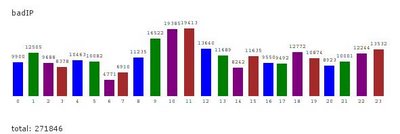
Here's a graph of an average 24 hours of banned IP address emails. Notice at 10am and 11am some joker (i.e., some single IP address) sent us over 19000 emails per hour.


I do have some code that has Java talk back to unix's iptables system to do very hard blocking of IP addresses but its not on right now. Partially because there's no need (yet) and partially because I like to see the stats.

The funny part of this is the error Mailinator gives. Remember the "User Unknown"? Once an IP address is banned and then it tries to open a new connection it will send the SMTP greeting of "HELO". Mailinator will then reply "User Unknown" and close the connection. Of course, it didn't even get the username yet.

Zombies

The next problem came from zombie
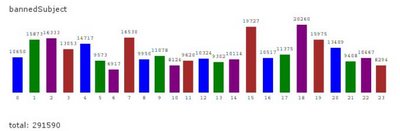
networks. Now we were getting spam from thousands of different IPs all sending the same message. We could no longer key in on IP address. As a layer of defense past IP we created an AgingHashmap based on subjects. That is, if we get (again, example numbers) something like 20 emails with the same subject within 2 minutes, all emails with that subject are then banned for 1 hour.

Here's a similar graph. Keep in mind these emails got past the IP filter - so basically they are "same subject" emails from many disparate sources.


You could argue we should ban them forever, but then we'd have to keep track of them and the Mailinator system is inherently transient. Forgetting is core to what it does. This blocking is more expensive than IPs as comparing subjects can be costly. And of course, we have to have enough of a conversation with the sending server to actually get the subject.

Pottymouth!

Finally, we ran into some issues on emails that just weren't cool. As I said, I'm far more interested in keeping Mailinator alive than blocking out your favorite porn newsletter. But, some unhappy people used Mailinator for some really not happy purposes. Simply put, as a last layer, subjects are searched for words that indicate hate or crimes or just downright nastiness.

Boing

Another major influx that happened early on was a plethora of bounce messages. Now thats sort of odd isn't it? I mean Mailinator doesn't send email. In fact, it CAN'T send email so how could it get bounce messages? Well, some spammy type folks thought it'd be neat to send out spam from their servers using forged Mailinator addresses as a return address. Thus when those emails bounced, the bounce came here.

What's worse, is I still get email from people who think Mailinator sent them
spam. Its very frustrating to defend myself against people who are ignorant of how email works ready to crucify me for sending them spam (especially ironic is that I run a free, anti-spam website). As I've said in my FAQ - please feel free to add mailinator.com to the tippy tippy tippy top of your spam blacklists. If you EVER get an email from mailinator.com, its a forged spam.

The good news is that bounces are very easy to detect, and are really the first line of our defense. Bouncing SMTP servers aren't particularly evil, they're just doing their job so when I say "user unknown" they believe me and go away.

On an abstract level, here is what happens to an email as it enters the system.
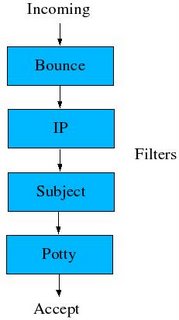


(and to be fair, there might just be another layer or two thats not on that diagram!)

Anti-Spam revolt

There are 2 more, somewhat conflicting features of the Mailinator server that should be noted. For one, its a clear fact that when we're busy, we're busy. An easy DoS against us would be to open a socket to our server and leave it open. This is an inherent vulnerability in any server (maybe especially multithreaded servers). So, as a basic idea Mailinator closes all connections if they are silent for more than a second or two. Actually, the amount of time is variable (read below). Clearly, we are DoS'able by sending us many many connections, but this blocks at least one trivial way of bringing us down.

Secondly, although we demand servers talking to us are very speedy. We reserve the right to be very NOT speedy. Here's the logic. When Mailinator is not terribly busy, we still demand responses quickly, but we give responses slowly. In fact, the less busy we are, the slower we give responses. It is possible that sending an email into the Mailinator SMTP server could take a very long time (like 10 or 20 or 30 seconds) even for a very small amount of data.

Why? Well.. think about it. Let's say you're spamming. You want to send out a zillion emails as fast as possible. You want every receiving SMTP server to get your email, deliver it to the poor sod who wants (or doesn't want) weener enlargement and then close the connection so you can go on to the next. If you encounter some darn SMTP server that takes 20 seconds to receive your email, the speed at which you can send out your emails diminishes. You might just even think about avoiding such SMTP servers.

It might be a pipe dream to think this is slowing down any spammers, but this does tend to keep my quieter times lasting longer. And it doesn't really hurt me - or my users. And if we eventually get terribly busy, those delays are scaled down to make sure we don't lose any emails.

Sites will ban it

Every time I read some comment about Mailinator, someone always points out something like "Yeah, well sites will start banning any email from Mailinator and then it will be worthless". Guys. Its been 3 years. A handful of sites have indeed blocked email from Mailinator, but my user base and the number of read emails has only gone up. Clearly, people are finding Mailinator more useful than ever.

I have added at times additional domains (like sogetthis.com and fakeinformation.com) that point to mailinator. Often if a site bans mailinator.com proper, you can use one of those to same effect.

Overall

Many copycat sites have appeared over the years which is pretty reasonable. This idea itself is obvious. The only real hurdle was that it seemed impossible to do given the amount of useless email you'd get. But the copycats had the advantage of seeing that Mailinator actually does work, so they knew what to shoot for. Only a few post their daily email numbers but I've yet to see any that come close to mailinator's incoming email (not that this is necessarily a good thing). I also see that many are using an architecture similar to Mailinator's original which is just fine so long as they either don't get any massive increases in email or are happy to keep buying bigger hardware.

Overall, Mailinator has been a great experience. It was a terribly fun exercise in optimization, security, and generally making things work. Thousands of people use it everyday and its amazing how many people know about it when it comes up in conversation. I've thought many times about how to make a business around it, and there is always an angle, but I've just been to busy with other things.

My hope is that its useful for you and that you tell your friends.


Digg!


Note: Eternal thanks to Jack Lawrence of Syracuse, NY who, in a drunken stupor gave me the core idea (story here), Nicci Gabriel of www.sideofsauce.com for the seriously cool web design, and to Brian Pipa of www.candyaddict.com who, as a big fan of Mailinator, added the very cool "Spam Map" and the RSS feeds.

This Blog has Moved !

The Mailinator Blog has moved to: https://manybrain.github.io/m8r_blog/ Check us out there !